Design smarter homes. Plan the electrics. Organise the parts.
MSG Plan brings home automation design and everyday electrical planning into one workspace. From rewires and extensions to connected homes, turn device layouts into clear installation drawings and complete parts lists.
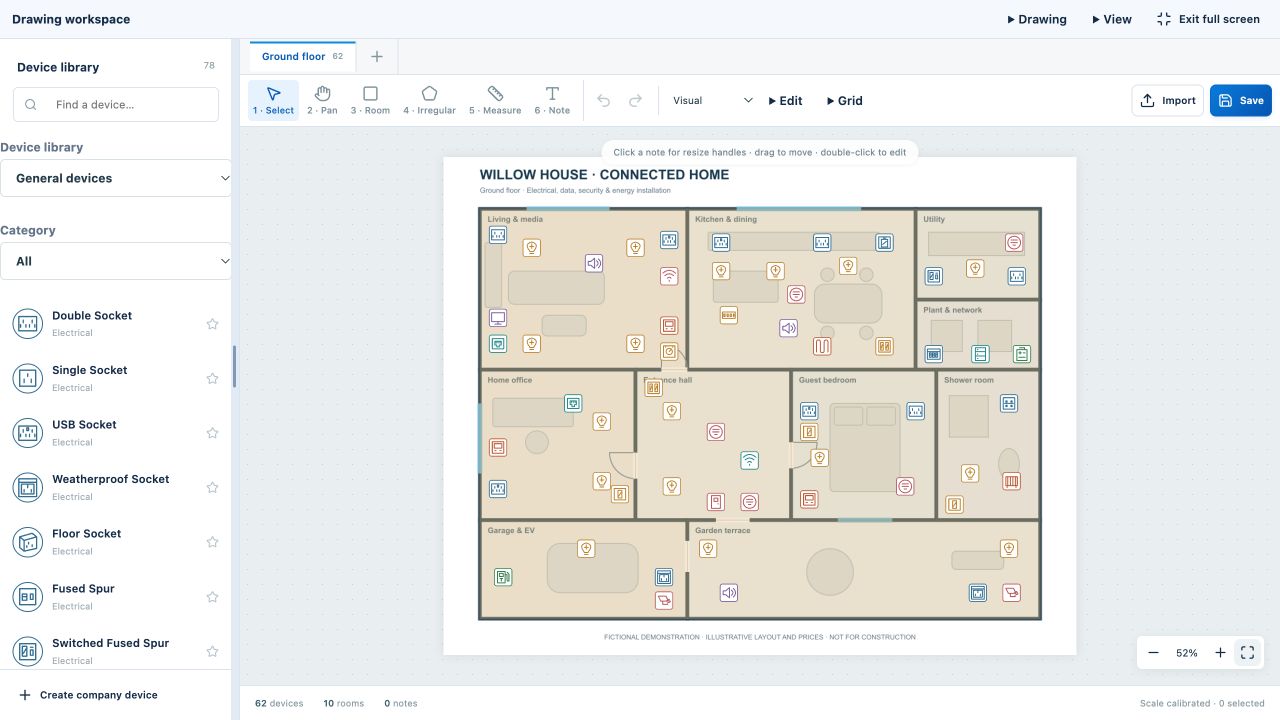
MSG Plan · 62 devices across 10 areas · Fictional demonstration
From floor plan to supplier-ready parts list.
Plan electrical, security, heating and renewable-energy installations. Build a clear layout, select products and extras, and bring your completed drawings and parts lists together in Final Issue.
Upload and crop image or PDF floor plans; set drawing scale and rooms.
Place, resize and rotate device symbols, with grid alignment for tidy layouts.
Select products, colours and extras, with combined quantities across the project.
Review drawings and materials in Final Issue, ready for PDF and CSV export.
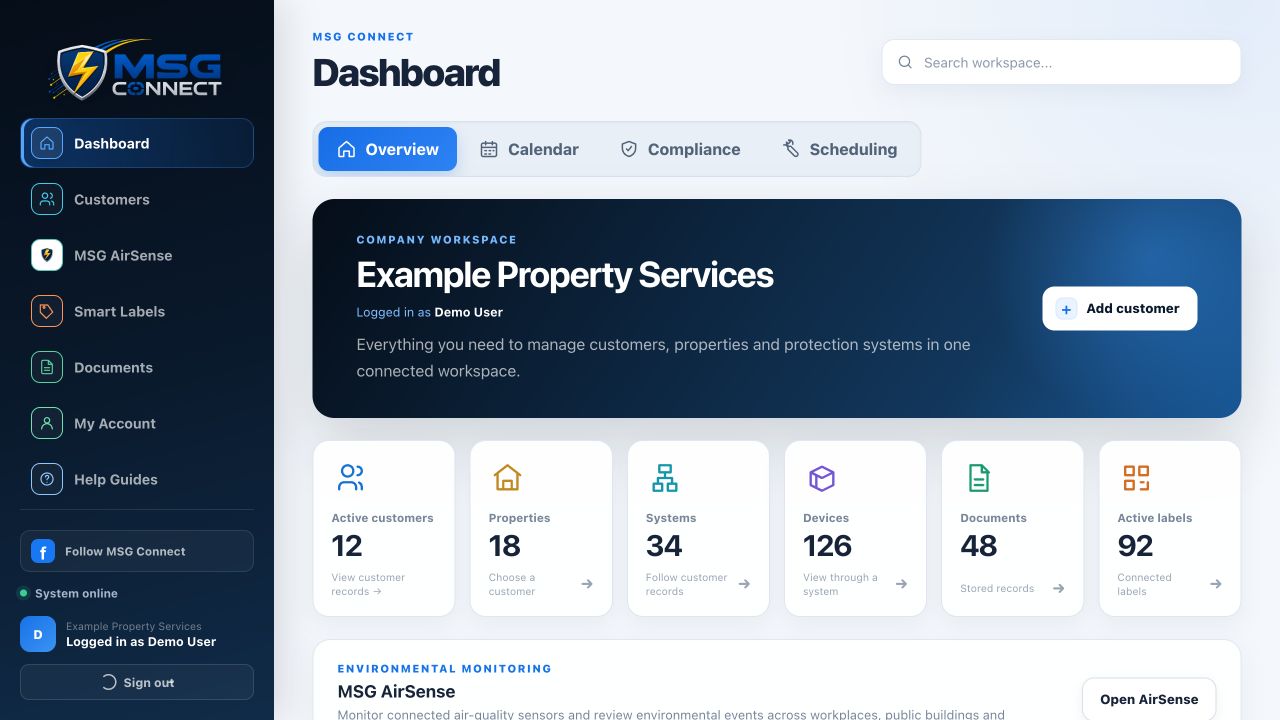
MSG Connect · Main dashboard demonstration · Fictional data
Every property. Every record. Connected.
Bring customer, property, system and device records into one company workspace. Give your team the information they need for service visits, compliance and ongoing maintenance.
Keep customers, sites, installed systems, documents and device history together.
Use QR and NFC-ready smart labels to find the right asset record.
Organise scheduling, compliance and field work, with branded reports.
Review MSG AirSense environmental readings, monitored locations and events.
Map keypads, controllers, sensors, lighting and shading across every room. Combine manufacturer libraries in a clear installation layout and organise the parts list around your chosen equipment.
Separate libraries for Loxone, Control4, Lutron and Rako
Product details, colour choices and optional extras
Customer plans with symbol keys and supplier materials lists
EVERYDAY ELECTRICAL PLANNING
Give every socket and switch a place.
Plan rewires, extensions, new builds and room upgrades. Lay out sockets, switches, lights, consumer units, data and safety devices without needing an automation system.
Upload a floor plan or create one with Pro or Business
Room areas, scale, alignment and reusable parts prices
Project-wide parts totals and Final Issue documents
YOUR CHOICE OF SYSTEM
Plan with the brands your customers choose.
Bring selected manufacturer devices into the same drawing as sockets, lighting, data and security. Build a coordinated installation plan, organise the parts and explain it clearly to your customer.
Loxone
Automation controllers, lighting, climate, energy and audio.
These products and logos belong to their respective manufacturers. MSG Plan is independent planning and parts software; listing a brand does not imply endorsement or partnership. Catalogue support covers layouts, parts lists and project documents, not live device control or manufacturer programming.
Logo credits
Loxone logo sourced from its official press page. Control4 and Lutron logo assets sourced from Control4’s website; Rako logo sourced from Rako’s website. All brand trademarks remain with their owners.
NEW IN MSG PLAN
From linked circuits to a visual consumer unit
See the latest features in our fictional Willow House demonstration project.
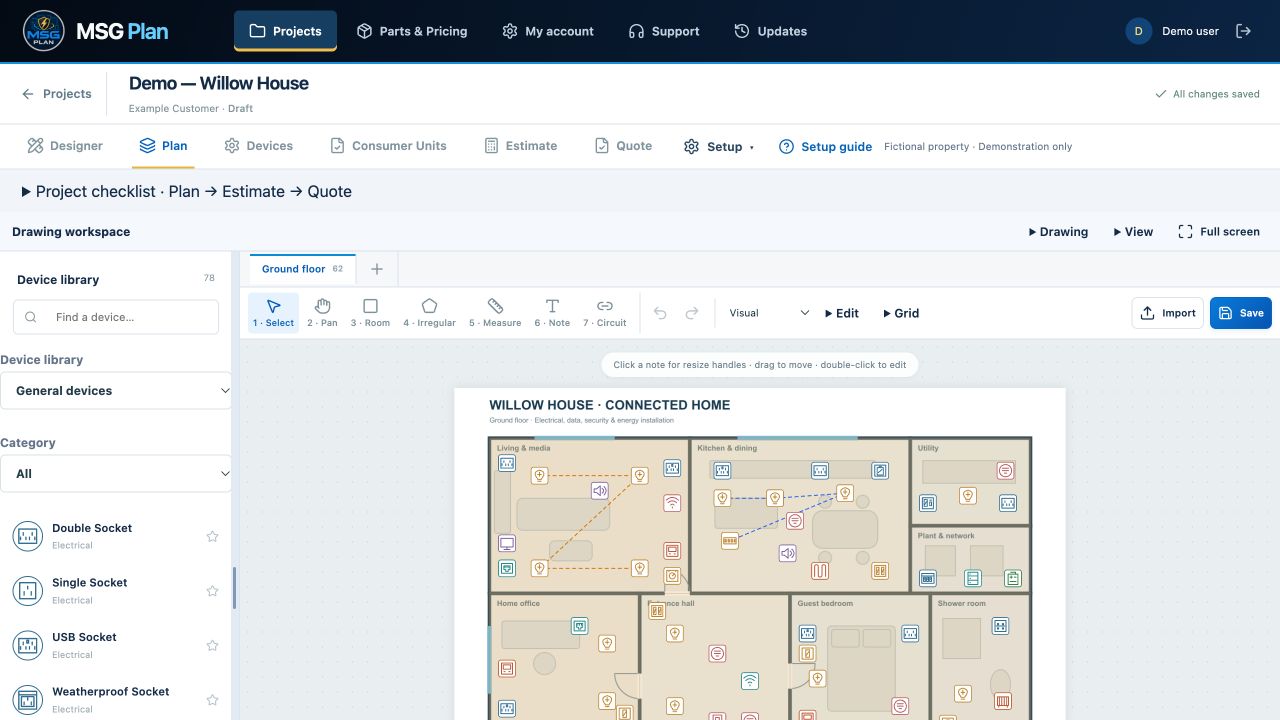
Colour-coded circuits and cable schedules
Link devices with dashed lines, name each circuit and choose from 20 colours or a custom colour. Record cable types and sizes on the Devices tab.
Pro, Business and Master.
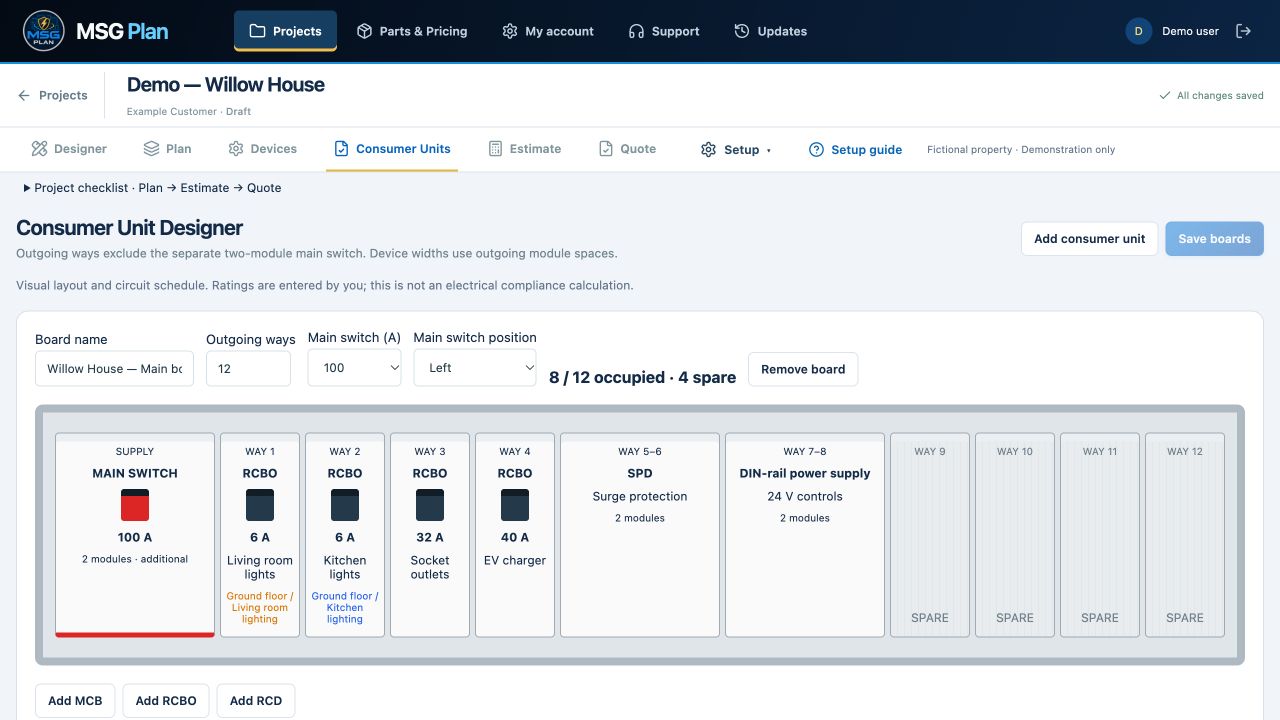
Consumer Unit Designer
Choose outgoing ways, position the main switch on either side and arrange MCBs, RCBOs and RCDs. Select amp ratings, label breakers and assign multiple circuits. Add SPDs, DIN-rail power supplies and other extras with adjustable module widths.
Business and Master.
Click either screenshot to view it full size. These visual layouts and cable schedules record your choices; they do not calculate electrical compliance or cable suitability.
More control on the plan: move and resize notes, add colour highlights, replace devices and manage shared device details and variations.
From your own floor plan to a supplier-ready parts list.
Design the layout, record installation details and prepare the documents your customers and suppliers need.
Create your own floor plans
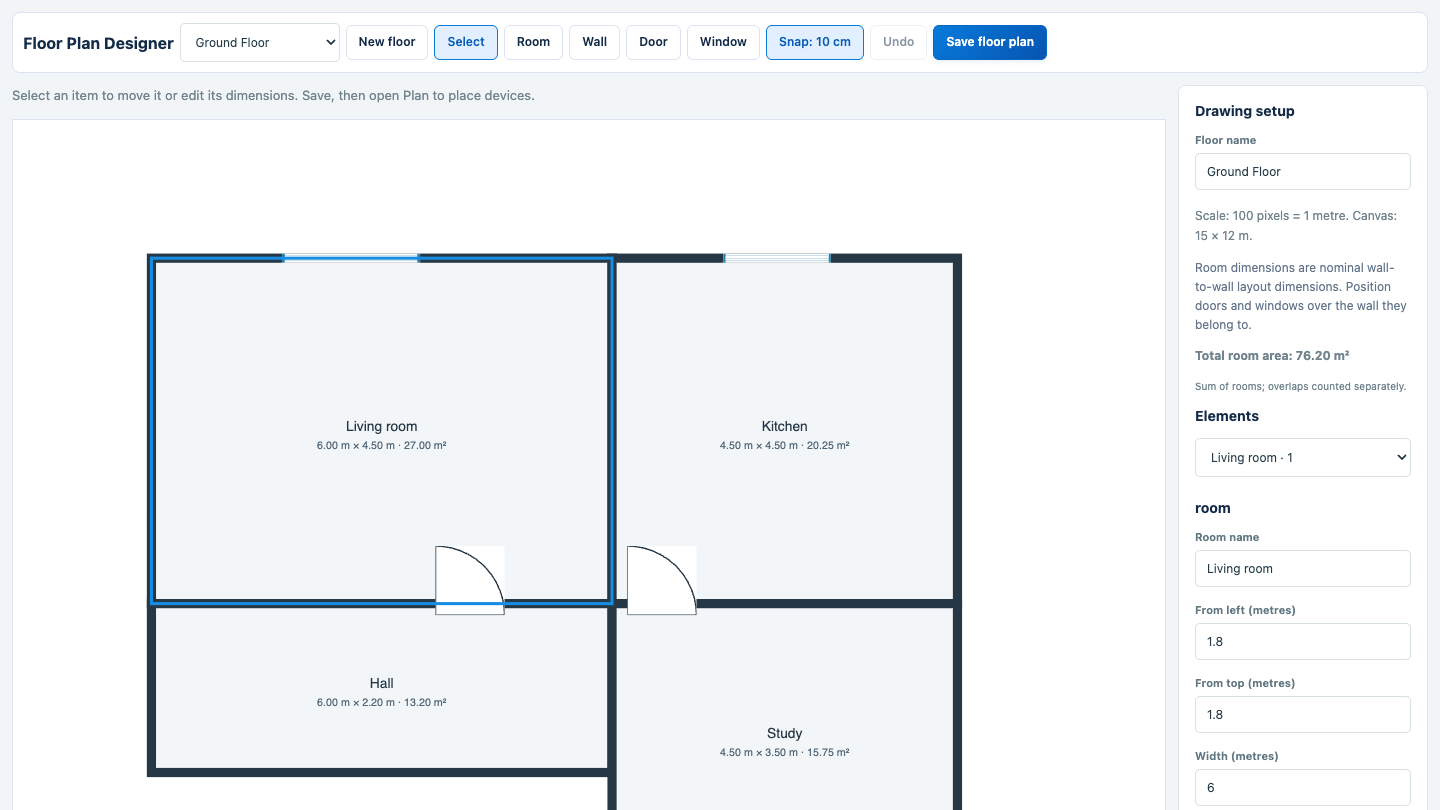
Included with active Pro and Business packages. Build rectangular rooms and walls, add doors and windows, and enter dimensions in metres. Save once: the drawing, rooms and scale appear automatically in Plan.
Make every room and device clear
Edit room boundaries, show or hide room labels and calculate areas in m² from your drawing scale. Add notes to individual devices, choose variations and use grid alignment.
Send suppliers a bill of materials
Download PDF or CSV lists from Final Issue with parts, selected extras, supplier part numbers and combined quantities. Colours appear alongside products, and supplier lists exclude prices.
Get started with guidance
The setup guide walks you through company details, parts, drawings, rooms, devices and Final Issue. Close it whenever you like and reopen it from your project.
Starter includes uploaded floor plans and the Plan → Devices → Final Issue workflow. The built-in Floor Plan Designer requires an active Pro or Business subscription.
Keep devices, cables, variations and supplier information together in Parts & Pricing. Find products by category and use Edit Product to manage their details. Update catalogue information through the spreadsheet import and export tools.
Cable types, sizes and lengths
Record cable types, sizes and lengths for circuits. Review the selected cable information alongside your device and consumer unit planning, and check quantities before ordering.
Symbols for electrical and smart-home plans
Choose from 765 searchable symbol options, including channel, zone and port variants. Separate Loxone, Control4, Lutron and Rako groups keep manufacturer products easy to find alongside standard electrical devices. Symbols appear on plans and exported device keys.
Bring everything together in Final Issue
Review completed drawings and combined parts quantities in one place. Export plans with or without wiring and prepare a supplier bill of materials as PDF or CSV, with no prices shown. Check product prices manually for each issue.
Cable lengths, quantities and prices are advisory estimates and are not guaranteed by MSG Plan. Check measurements, cable specifications, installation requirements and current supplier prices before ordering or installation. Cable routes and circuit design are not calculated automatically.
Prices are per month, excluding VAT where applicable. Each product requires its own subscription. All MSG Plan packages include floor-plan uploads and cropping, device placement, product and extras selection, combined parts quantities and Final Issue documents. All saved projects count towards the allowance, including completed projects and design options. Choose your MSG Plan subscription and manage billing in My Account.
WHICH SYSTEM DO I NEED?
Two products. Two clear jobs.
Your task
MSG Plan
MSG Connect
Main purpose
Plan an installation and organise its parts
Manage installed assets and ongoing service
Floor plans
Lay out devices, set scale and define rooms
Locate recorded assets within a property
Daily workflow
Plan → Devices → Final Issue
Customer → property → system → device → service history
Key outputs
Installation drawings and supplier-ready parts lists
Asset records, smart labels, schedules and service reports
Best suited to
Installers planning projects and ordering parts
Property managers and teams maintaining existing systems
Each product has its own account and workspace. Choose either system for its specific job; using both does not currently mean automatic data sharing.
Whether you are considering MSG Plan, MSG Connect or already use our software, tell us which product your enquiry relates to and how we can help.
01New customersQuestions about features, subscriptions or getting started.
02Existing customersAccount, billing or technical support. Signed-in users can also track requests in Support.
Inactive trial accounts
MSG Plan and MSG Connect trial and expired-trial accounts with no activity for 60 days may be permanently deleted, together with their saved workspace data, following administrator review. Paid subscriptions are excluded. Deletion is not automatic. If your trial account is deleted, you are welcome to create a new account and start again; previous data will not be restored.